Fasly AI: the personal AI assistant that runs my laptop from Telegram
Fasly AI is my personal AI assistant on Telegram. It speaks English, Malayalam and Manglish, manages tasks and reminders, and controls my Windows PC — and it asks before anything risky.
Most AI assistants are good at talking. I wanted a personal AI assistant that actually does the work — on my phone, on my laptop, and in the way I really speak, which is a mix of English, Malayalam and Manglish.
So I built Fasly AI: a personal AI assistant I message on Telegram. It manages my tasks and reminders, remembers what matters, researches things for me, and controls my Windows PC when I'm not sitting in front of it.
Here is what it does today, how it works under the hood, and how I made it safe enough to trust with my own computer.
What is Fasly AI, my personal AI assistant?
Fasly AI is a personal AI assistant with two front doors:
- Telegram — text or voice notes, from anywhere.
- A desktop app on my laptop — type, hold a key and talk, or switch on hands-free mode.
It's a Telegram AI assistant first. Both front doors talk to the same brain and share the same memory and conversation, so I can start something on my phone and finish it at my desk.
Why I built my own AI assistant
Off-the-shelf assistants kept falling short in three places:
- Language. I think and type in Manglish. Most assistants either answer in English or get confused by mixed scripts.
- Action. A chatbot can tell me how to move a file. I wanted one that moves the file.
- Always on, without my laptop. I can't keep my computer running 24 hours a day, so the brain had to live in the cloud and stay reachable from my phone — on free or low-cost hosting.
Fasly AI is my answer to all three.
A Manglish AI assistant that also speaks Malayalam and English
Language was the first thing I cared about. Fasly AI replies in the language of each message:
- Write in English, get English.
- Write in Malayalam script, get Malayalam script.
- Write Manglish ("laptop il ethra battery und?"), get Manglish back.
It switches from one message to the next, so a mixed conversation never gets stuck in one language. That makes it a true AI assistant in Malayalam, not just an English bot with translation bolted on.
It's a voice AI assistant too. Send a voice note in Malayalam and it shows you exactly what it heard, replies in text, and then answers with a voice note read in a warm, natural style.
Everyday help: tasks, reminders and memory
- Tasks and to-dos in plain language — "add a task: send the invoice by Friday 5pm, high priority", "what's overdue?", "mark the invoice task as done".
- Reminders at exact times, delivered as Telegram messages.
- A morning briefing every day.
- Memory — tell it "my main stack is Next.js and Supabase" once, and it uses that from then on.
- Web search and a research specialist that runs several searches, reads the sources and comes back with a sourced summary.
Control your PC from Telegram
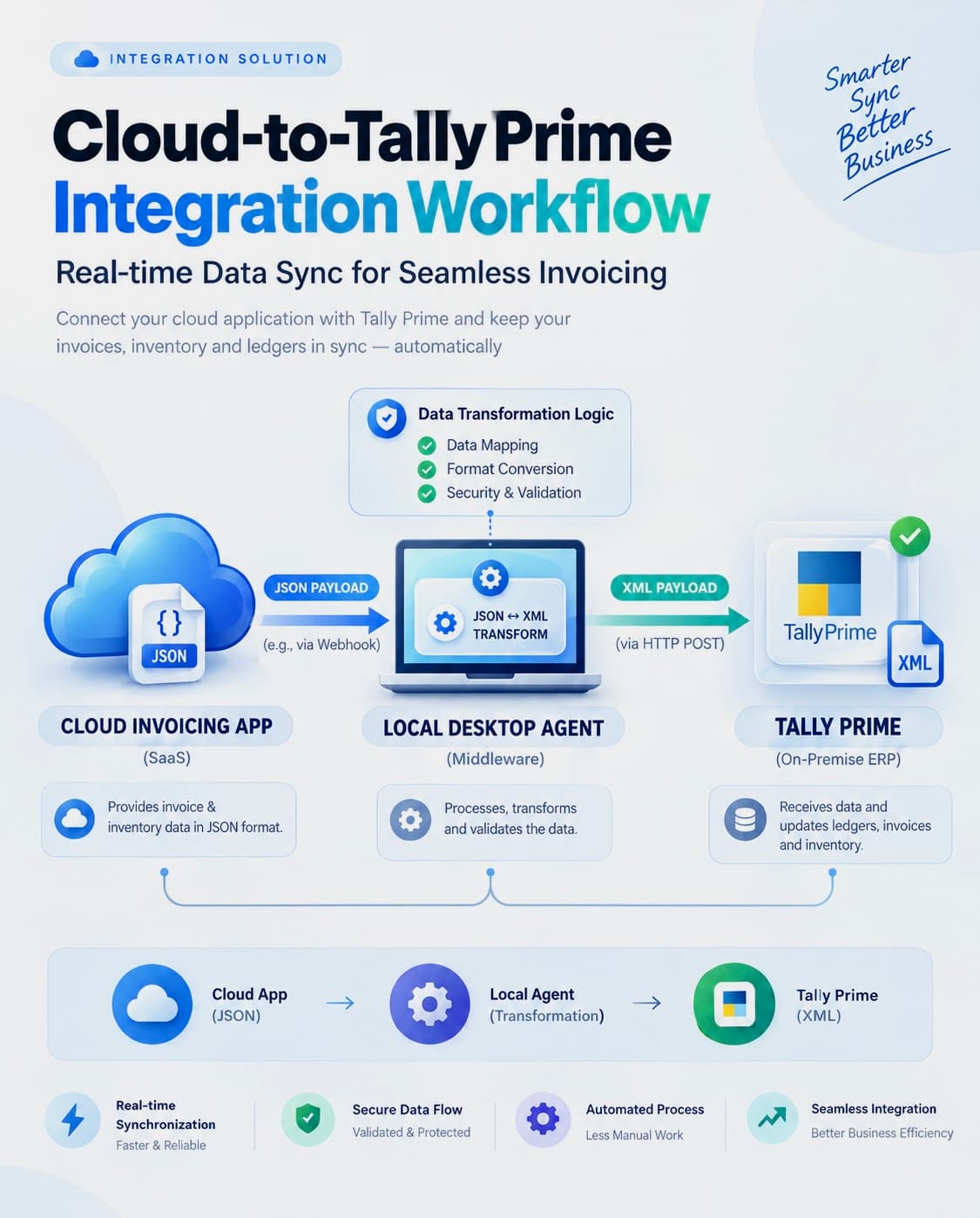
This is the part people ask about most. A small desktop agent runs on my Windows laptop, and Fasly AI sends it jobs — the same cloud-to-desktop pattern I used to connect a cloud invoice app to Tally Prime.
To control PC from Telegram, I just message it from my phone.
Apps and windows
- "What apps are open?" — it lists every open window.
- "Open Spotify" — it opens the app, or brings it to the front if it's already running.
- "Minimize Chrome", "maximize VS Code" — window control.
Typing, media and screenshots
- "Type 'meeting moved to 5pm' in Notepad" — it types into the app, in any language.
- "Pause the music", "volume kurakku" — media keys.
- "Send me a screenshot" — the photo arrives in Telegram.
Files and system info
- "What's in my Downloads?", "move report.pdf to Documents" — file work inside the folders I allow.
- "What's my battery?" — CPU, memory, battery and uptime.
The desktop app shows every action it ran, with the result next to it.
A day with Fasly AI
Here's how it fits into a normal working day:
- Morning: the briefing lands in Telegram with what's due today and what's overdue.
- On the way to a meeting: I send a Manglish voice note — "Friday invoice task add cheyyu, high priority" — and it's on the list.
- Away from my desk: I ask for a screenshot to check a long build, then tell it to pause the music I left playing.
- Evening: I ask the research specialist to compare two tools and read the sourced summary before bed.
None of that needs me to open a laptop.
How it works under the hood
The architecture is simple on purpose:
- Telegram or the desktop app sends my message, text or voice, to a TypeScript server.
- The server asks the AI model what I meant, picks the right tool — tasks, memory, research or PC control — and checks the safety rules.
- Supabase stores memory, tasks and the action queue.
- The desktop agent on my laptop picks up PC jobs from the queue, runs them, verifies the result and reports back.
- Reminders are scheduled so they fire at the exact time, even when my laptop is off.
Because the brain lives in the cloud and the PC is just one of its tools, the assistant keeps working when the laptop is shut. Only the PC actions wait until it's back online.
Built so it can't go rogue
Giving an AI control of your computer only works if you can trust it. These rules are built into the code, not just the prompt.
Nothing risky without my approval
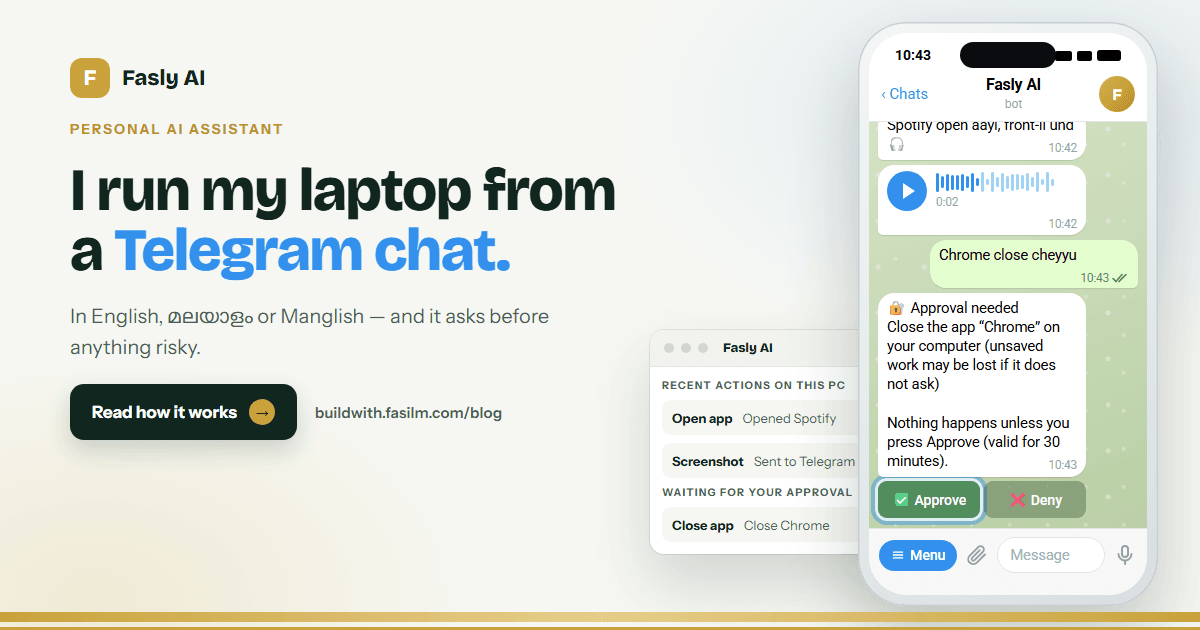
- Approval for anything risky. Closing an app, pressing keys (Enter can send a message) and deleting a file never happen on their own. Fasly AI sends me an Approve / Deny button, and nothing runs until I press it. The AI can ask; it can never approve itself.
- It says what it checked. Every action reports done (it happened and was verified), unverified (it was sent but couldn't be confirmed) or failed (and why).
- Undo. File moves, renames and new files can be undone with /undo, one step at a time.
Hard limits and a paper trail
- A kill switch. /stop pauses everything instantly; /resume turns it back on.
- Fenced-in files. It only touches the folders I allow, and never reads secrets like .env files or keys.
- No strangers. Only my Telegram account is served. Everyone else gets silence.
- Untrusted content stays data. If a web page or file says "ignore your rules", the assistant reports it instead of obeying.
- A full audit log of every action it took.
What it runs on
Fasly AI runs on Google Gemini for understanding, voice transcription and speech. Around it:
- a TypeScript server on Vercel,
- Supabase for memory and the action queue,
- Upstash QStash for reminders.
It's designed to run on Gemini's free tier. It starts with a fast model and falls back to others when one hits its daily limit, so a busy day slows it down instead of stopping it.
Typical replies take a few seconds. Anything that touches the PC adds a few more while the desktop agent does the work and checks it.
What's next
- A developer agent that works on a branch, runs tests in a sandbox and asks before pushing.
- A marketing agent with a brand file and a content calendar — again with approval before anything is posted.
- Its own app with live voice.
Want a personal AI assistant for your work or business?
The same building blocks — a chat front end, an AI brain in the cloud, a desktop or system agent, and approval before anything risky — work well beyond my own laptop. They fit business workflows like order updates, internal tools and back-office automation.
If you're building something similar, or you want an assistant like this for your team, take a look at my AI automation services, browse my recent work, or get in touch. I'm happy to share what I've learned.
Frequently asked questions
Can Fasly AI understand Malayalam and Manglish?
Yes. It replies in the language and script of each message — English, Malayalam script or Manglish — and transcribes Malayalam voice notes.
Can it really control my computer from my phone?
Yes, through a desktop agent that runs on the PC. It can open and close apps, control windows, type text, use media keys, take screenshots and work with files in allowed folders. It works on Windows today.
Is it safe to let an AI control my PC?
Risky actions — closing apps, pressing keys and deleting files — wait for an Approve button that only you can press. File changes can be undone, /stop pauses everything, and every action is logged.
Does it need a paid AI subscription?
No. It's built to run on Google Gemini's free tier, which has daily limits. When one model's limit is reached, it moves to the next one.
Does it reply with voice?
Yes. Send a voice note and you get the transcription, a text reply and a voice-note reply.
Written by Fasil M
Freelance full stack and AI developer with 2+ years of experience building SaaS products, business apps and community apps for clients worldwide.